
Each module, with its own screen.
The 18 modules sit in five groups, in the order of the working day, from the first patient to cashing up. Ctrl+K (⌘K on Mac) takes you to any module or patient from any screen. The screenshots below come from a demo account.
Jump to a module
The first patient arrives
0118
Patients
The top of the record shows orders in progress, the balance due and the next appointment.
One search box covers the whole register, by name, phone number or personal numeric code (CNP). When it finds no one, the new record opens already filled in with what you searched for.
- Type “stefanescu” and you find “Ștefănescu”, with the parts of the name in any order.
- The 13-digit CNP is verified against its check digit and fills in the date of birth and sex by itself.
- A new record with a CNP already on file stops at “Already exists:” and is created only with “Create anyway”.
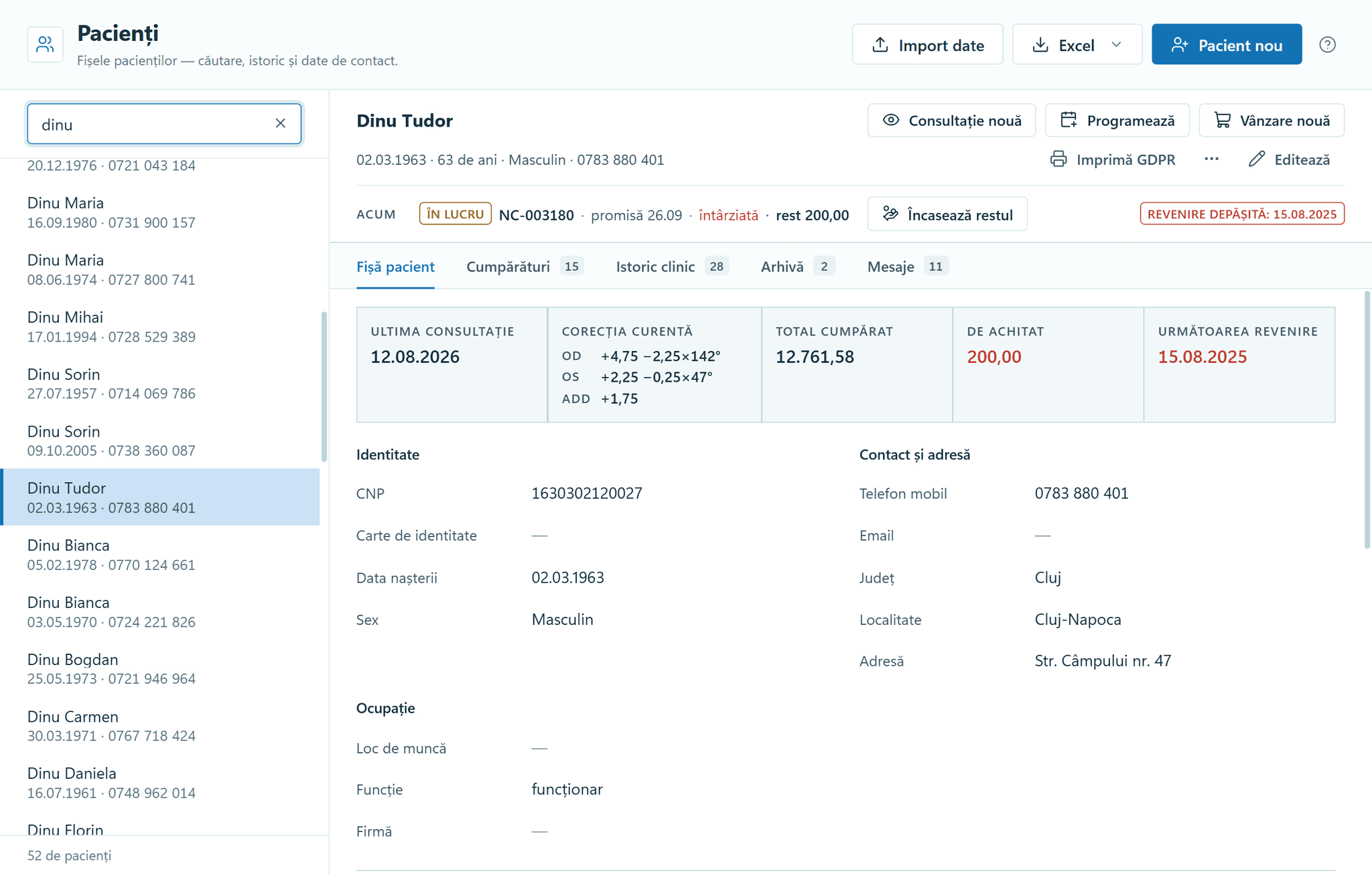
Patients — the record, with the open order and the summary. 0218
Consultations
You enter the refraction once, and the prescription and the next check-up date come from it.
Each eye has its own refraction for distance, intermediate and near, with the diagnosis chosen from the practice’s own list. Before you pick the patient, the screen shows the working day: who has arrived, who is next and who has been seen today.
- Near values filled in from the addition stay marked “calculated from Add”.
- A value outside the range stays red, blocks saving and is never rounded to the limit.
- “Save and book” opens the appointment with the patient, the “Check-up” type and the day already filled in.
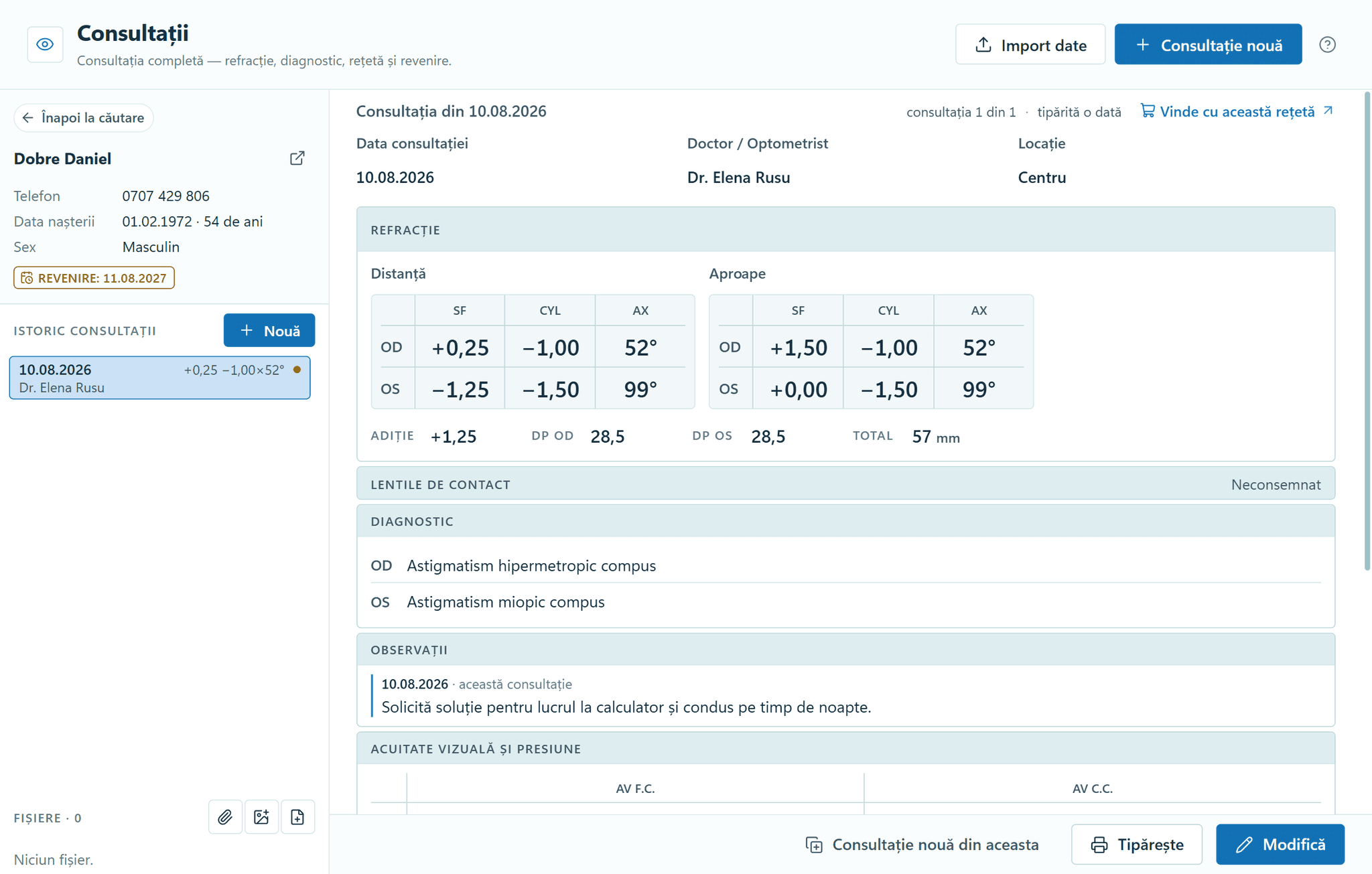
Consultations — refraction, diagnosis and history. 0318
Doctors
Reception books against each doctor’s schedule, with holidays and closed days already taken out.
Each doctor has a weekly schedule for every location. You draw the schedule with the mouse in 30-minute steps, and it saves itself.
- An absence added under “Absences” instantly lists the appointments already booked on those days.
- An appointment during leave or outside the schedule is saved only after “Continue anyway”.
- For an external collaborator, the record shows the sales they referred this month and in total.
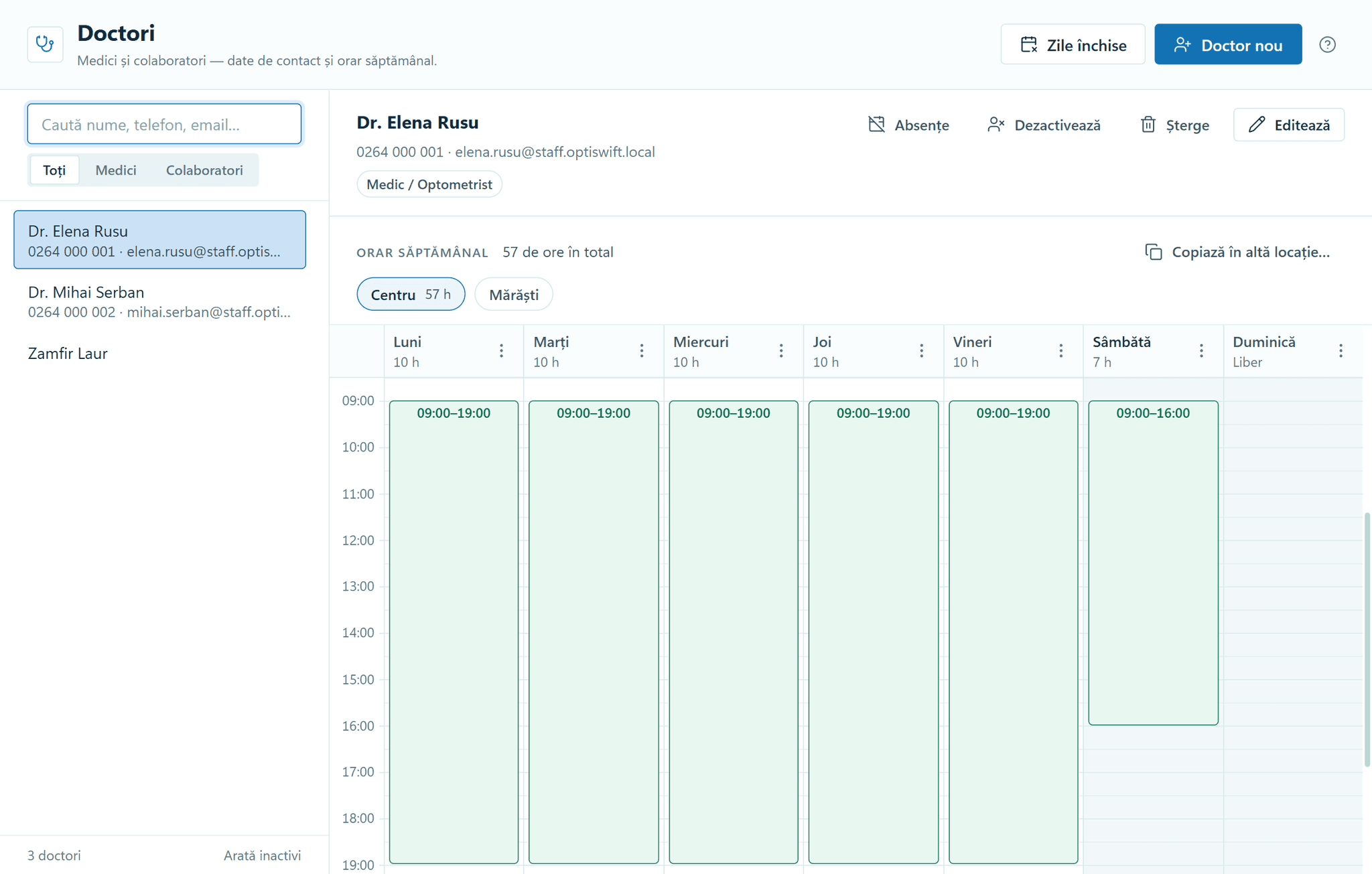
Doctors — the weekly schedule, per location. 0418
Appointments
Reception has the day’s call list: appointments to confirm, patients who didn’t turn up and recalls that are due.
The calendar shows each doctor’s week, day or month over their schedule, and a time outside the schedule is booked only after confirmation. “Arrived” and “No-show” are marked in one click.
- The database refuses two overlapping appointments for the same doctor, even at different locations.
- The same doctor’s appointment at another location appears dimmed, with the location’s name.
- “No answer” on a recall puts the patient back on the “To call” list on the next day the practice is open.
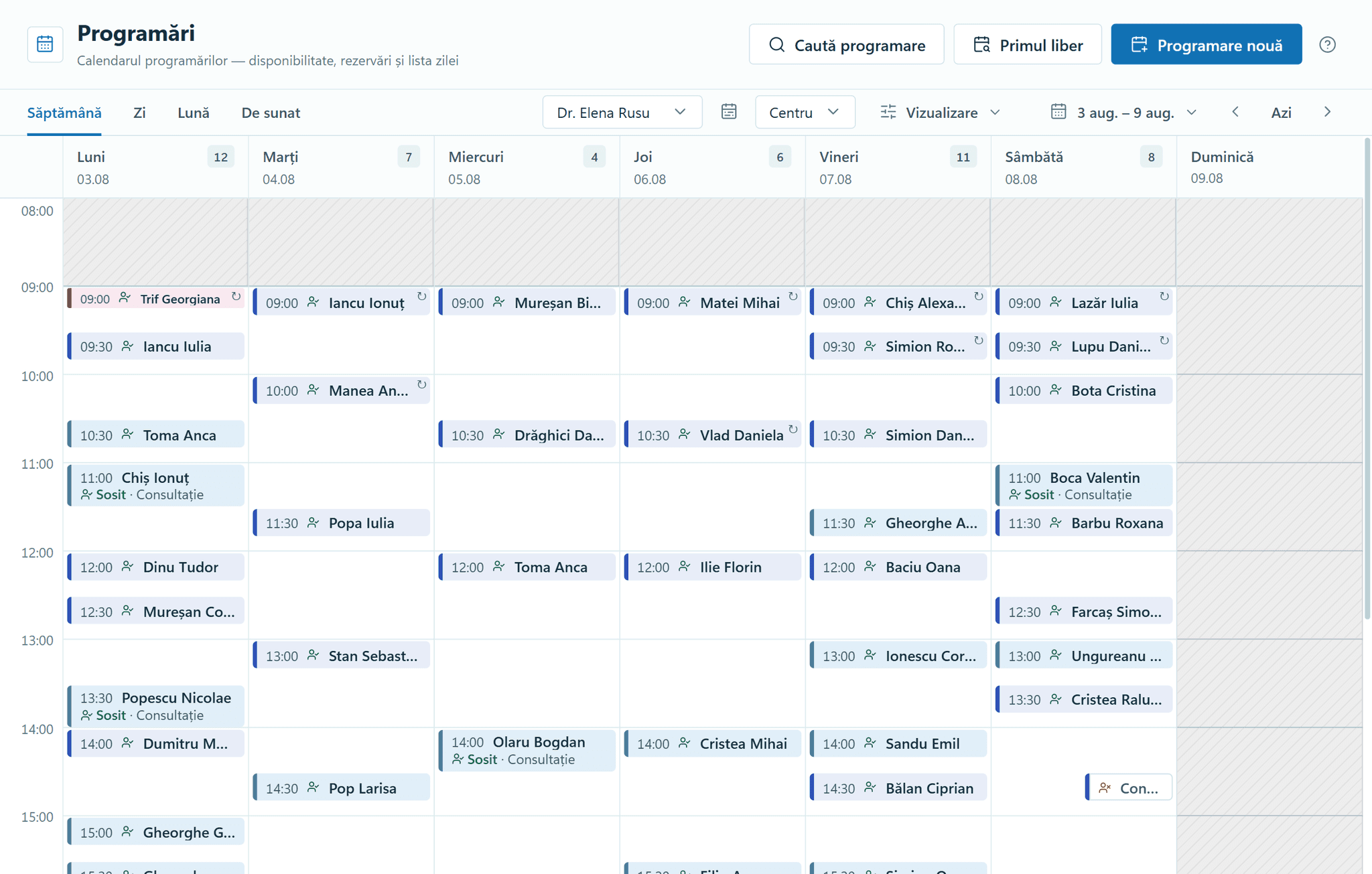
Appointments — the week, over the doctor’s working hours. 0518
Clinical reports
The list of patients to call in for a check-up writes itself, with the status of each recall.
The reports cover recalls, diagnoses and activity, by doctor and by location. The button on each row opens the booking window with the recall attached.
- Each recall has its status written out: “12 days overdue”, “Due today”, “Not yet due”, “Booked”.
- The “Appointment” column shows what has already happened: “Seen 22 Sep”, “Booked 3 Oct” or “Called today · no answer”.
- A patient seen again after the recall was set shows as “Seen in the meantime” and drops off “To do”.
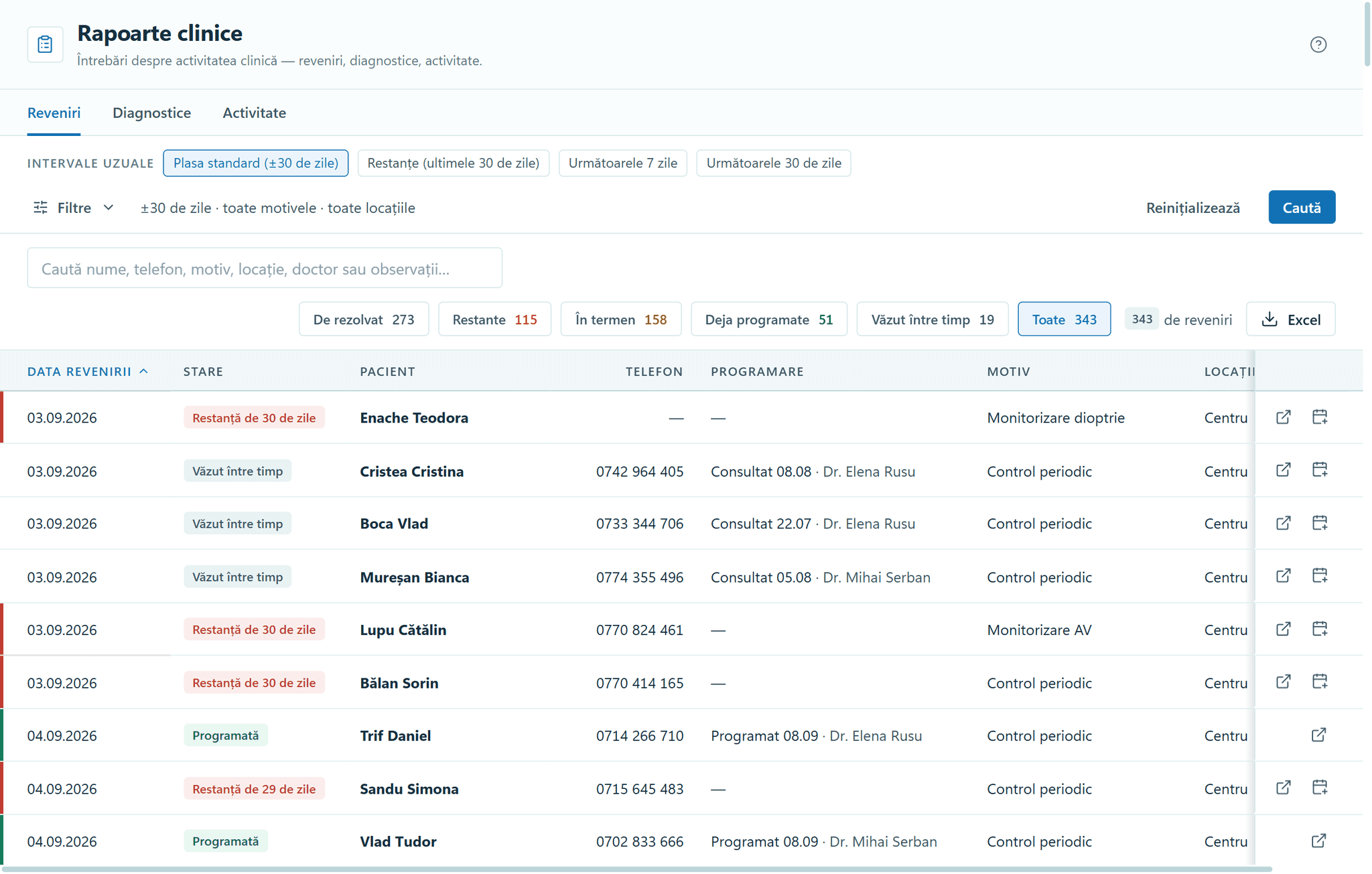
Clinical reports — the recalls and the state of each.
The goods receipt sets the price
0618
Stock
See what you have, at what price and with what markup, at every location.
Each item shows the quantity, purchase price, selling price, markup and supplier, and a practice with several locations also sees the others’ stock. “Unsold goods” and “Reorder” show what is sitting unsold and what needs ordering.
- A stock adjustment is recorded as a new movement in the ledger and rewrites nothing.
- “Unsold goods” splits unsold stock into “6–12 months”, “12–24 months” and “Over 24 months”.
- In “Reorder”, “Suggested” takes the stock on the shelf and what is already on order away from the set level.
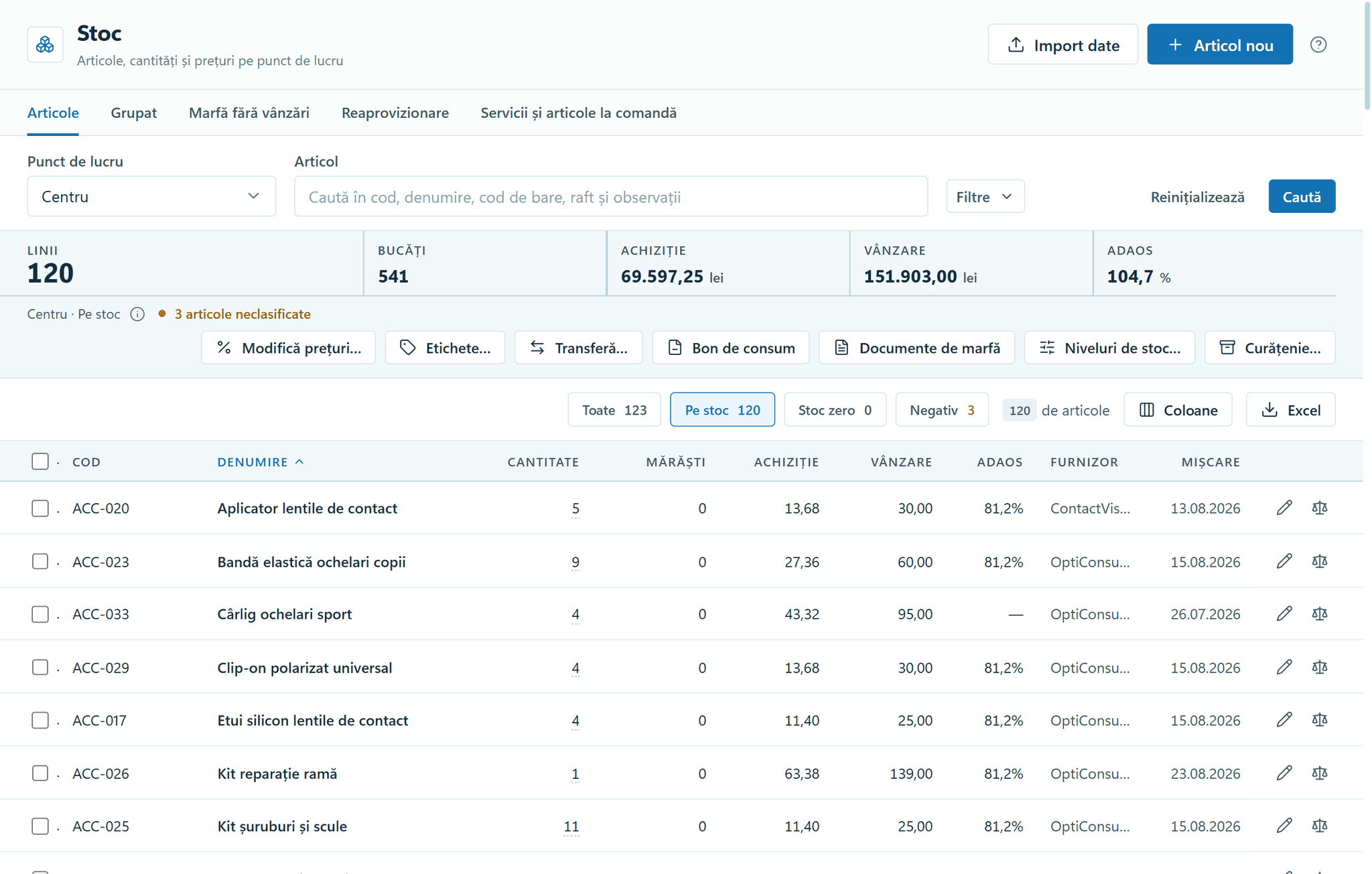
Stock — the items, with their value and markup. 0718
Goods receipts
A completed goods receipt writes the goods received note (NIR), the stock movement, the shelf price and the amount owed to the supplier.
On each line you enter the markup or the selling price, and the program calculates the other. The NIR saves itself as a draft, so a receipt you have started is waiting when you come back.
- The NIR number is assigned only on completion, so the series has no gaps.
- Shipping and cash-on-delivery charges on the invoice are spread across the items’ cost, by the value of each line.
- A completed NIR can be corrected only by reversing it.
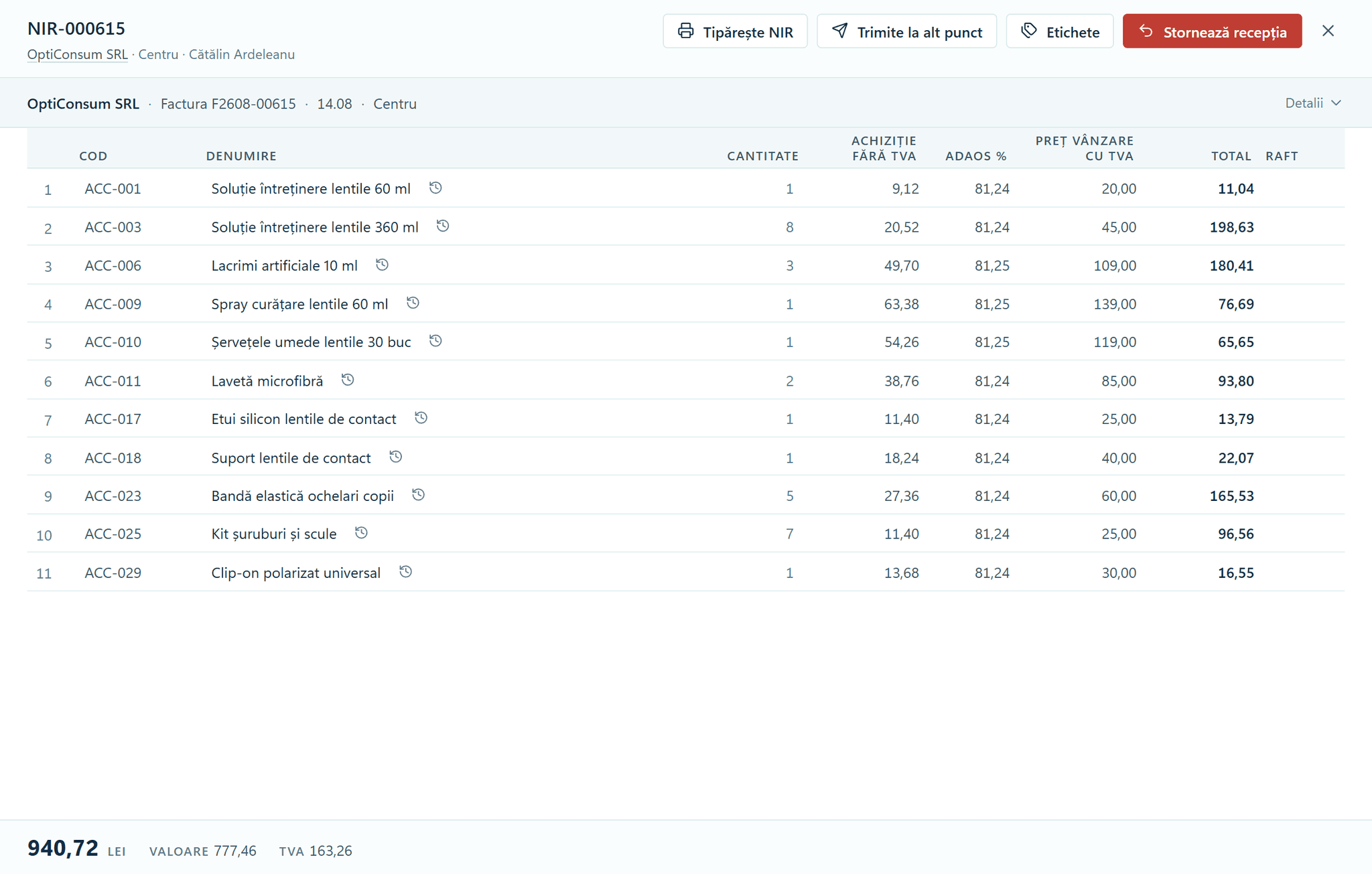
Goods receipts — the NIR, with the price and markup on every line. 0818
Suppliers
You know how much you owe each supplier, and for how many days.
The screen opens on balances, with the age of each debt in 30-day bands. One payment can cover several invoices, each with its amount filled in from the balance due.
- The filters aren’t limited to one month, so a March invoice still shows as unpaid in July.
- Only cash payments go into the Cash book, and the dialog says so before you confirm.
- “Reverse payment” asks for a reason and keeps the payment in the history, with the reversing entry beside it.
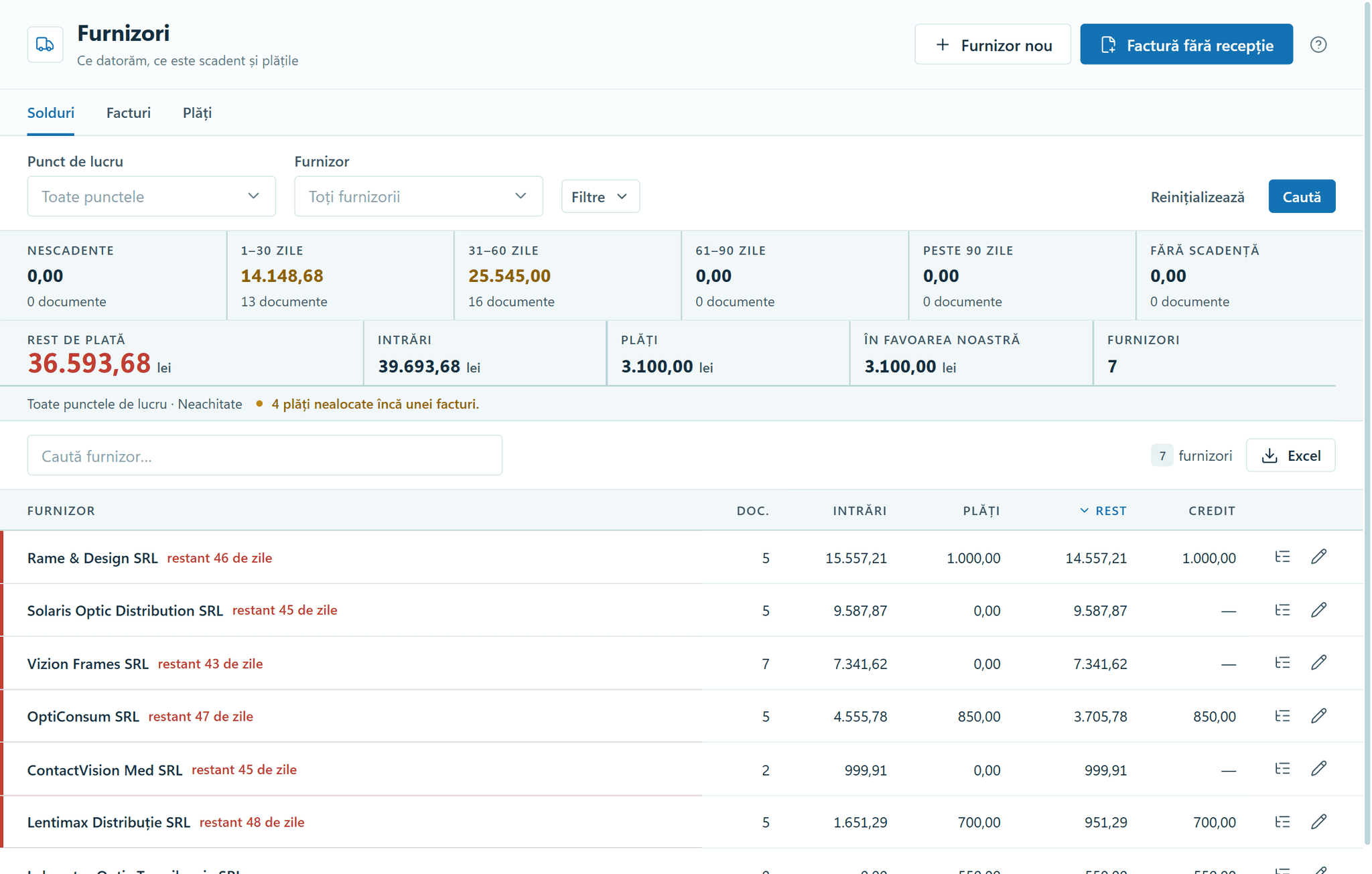
Suppliers — balances and debt ageing. 0918
Stocktake
You count with the scanner, and the program flags what was sold or received in the meantime.
Several colleagues can scan into the same stocktake, and the program tells you when someone else has already counted an item. The quantity on record freezes at the first scan, and the difference is calculated against it.
- If an item was sold or received after it was counted, that case must be ticked off before you finish.
- Items nobody touched stay unchanged and are recorded as “not counted”, never as zero.
- The stocktake list prints on Romania’s standard form 14-3-12, with signature spaces for the stocktake committee and the stock keeper.
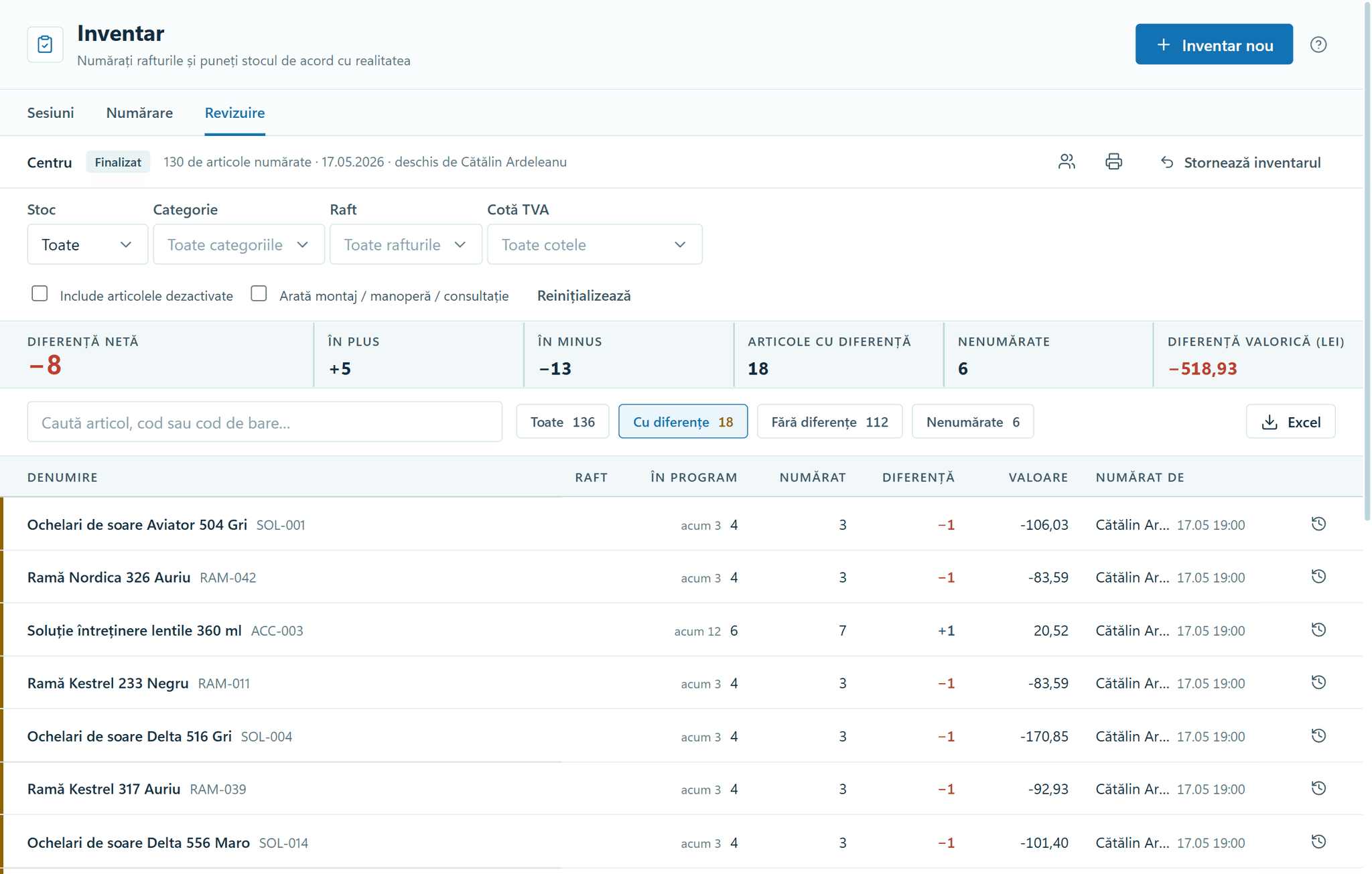
Stocktake — the differences, item by item. 1018
History and valuation
Find the value of your stock on any date, calculated from the stock movements.
The value on a chosen date is calculated on demand from the movement ledger, at weighted average cost. The stock report starts from the opening stock, runs through every movement in and out, and ends on the closing stock.
- Scan an item into the search and see its movements over the past year, with the stock after each line.
- Lines with an unclear cost split the total into “Certifiable value” and “Value to check”.
- The exported file records the date, the basis of calculation, the locations, who generated it and when.
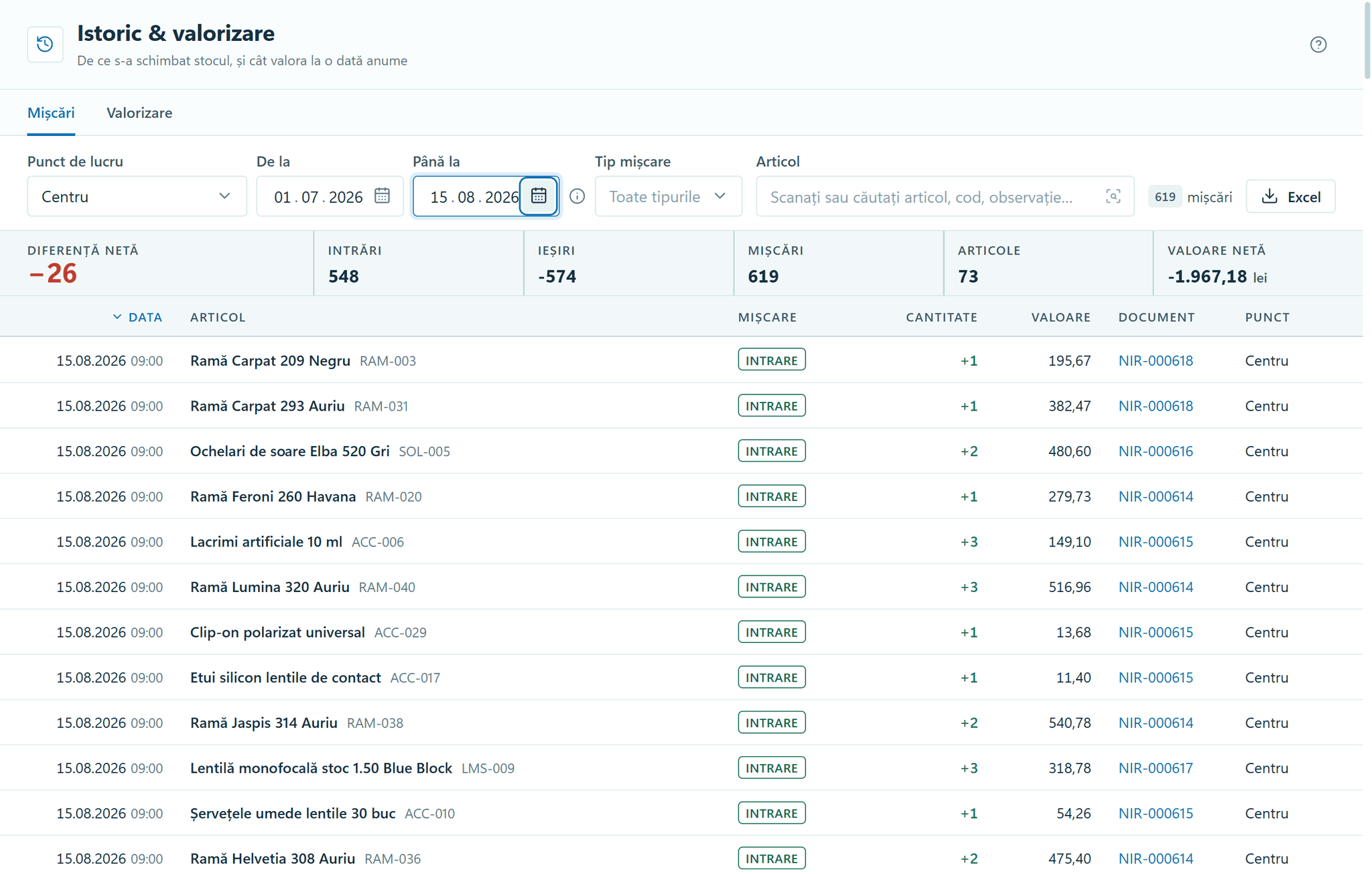
History and valuation — the movements in order, with their documents.
Take full payment or a deposit
1118
Checkout
Scan, apply a discount if needed and take payment, with stock and the cash book up to date.
The prescription stays in view while you sell, and one sale can take a deposit and several payments. Your fiscal cash register issues the fiscal receipt, whatever its make, and the program keeps the receipt number on the sale. Direct printing is switched on for each model once it has been verified on the device.
- The unit price can’t be typed in, and a discount needs a permission and stays on record.
- A sale you started and left for another screen is waiting when you return.
- The order note reads “This document is not a fiscal receipt”, and the text can’t be changed.
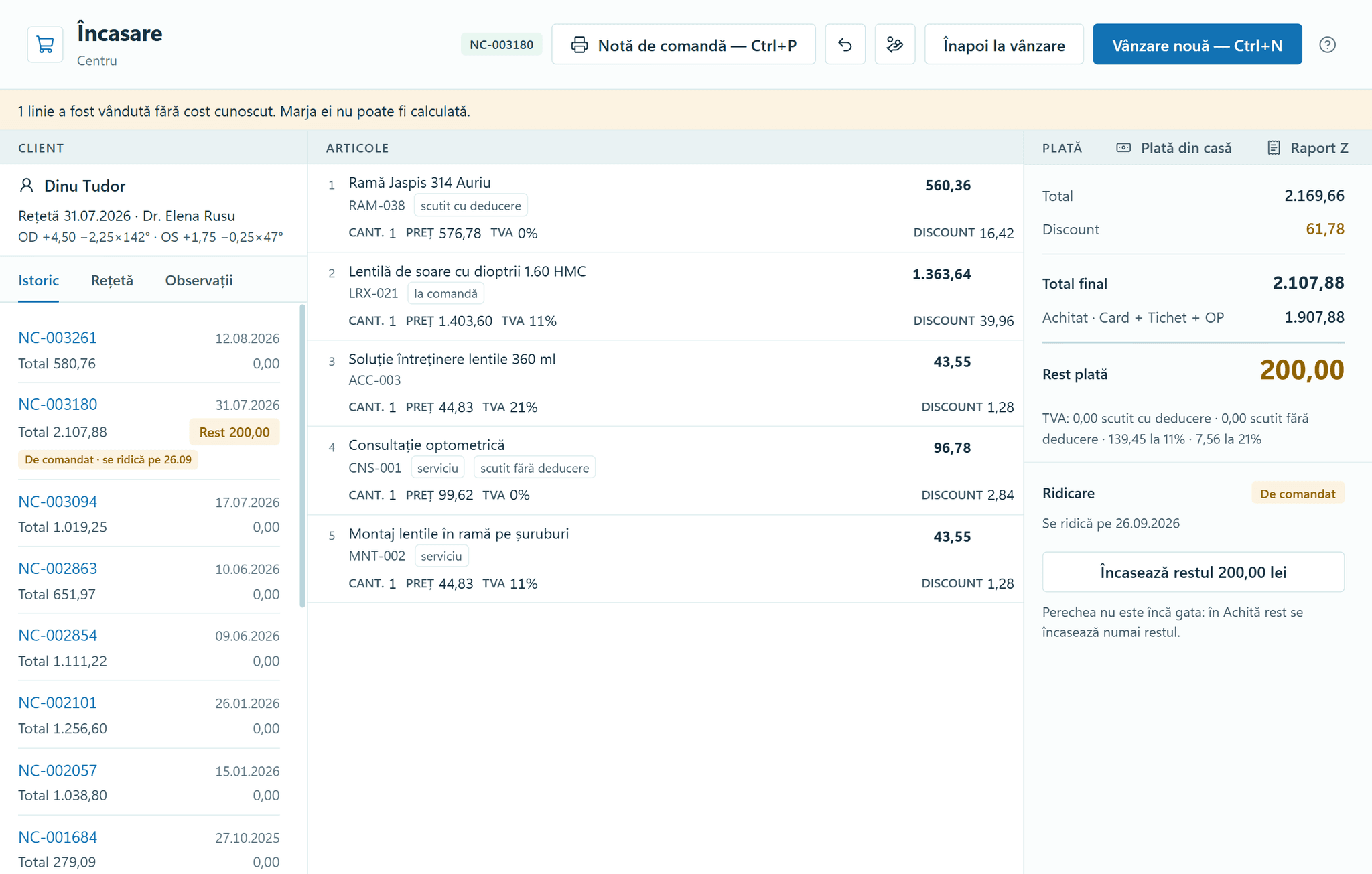
Checkout — the sale, the payment and the collection. 1218
Orders
Every morning you know which order is at the lab, which pair is ready for collection and which deadline has passed.
A lab order moves through To order, Ordered, Arrived and Ready, with the date promised to the customer and the lab’s reference. Each morning the “Today” tab gathers the promises coming due, the delays, the customers to call and the pairs left on the shelf.
- If an order isn’t in the open tab, search finds it in the other tabs and at the other locations.
- For a pair with a balance due, “Hand over” asks once and offers “Collect balance” or “Hand over anyway”.
- A new complaint gets the statutory deadline of 15 calendar days, shown in the “Deadline” column.
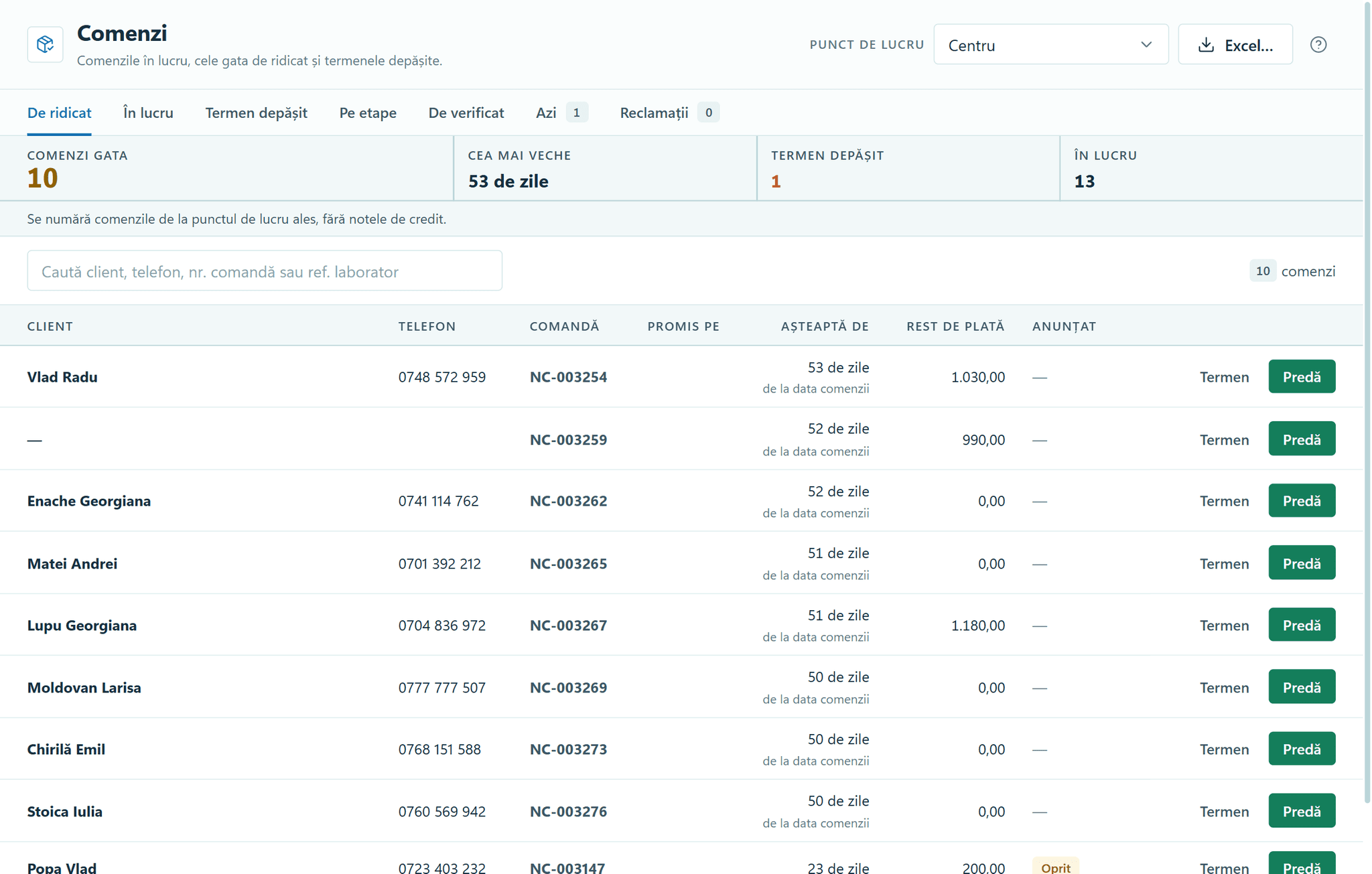
Orders — the pairs that are ready, oldest first. 1318
Balance payments
All outstanding balances sit on one screen, oldest first, with the balance after each payment.
Part payment is the usual case, so you lower the amount in “Paying now” and “Remaining” recalculates. A balance closed without money is recorded as a return, a discount or a waiver, each with its own effect in the accounts.
- The 8–30 days cell isn’t coloured, because that is the normal lead time for making lenses.
- Waiving a payment needs a written reason and the amount typed again, and it stays out of “Collected”.
- After payment, “Hand over pair” records the collection of the glasses from the same screen.
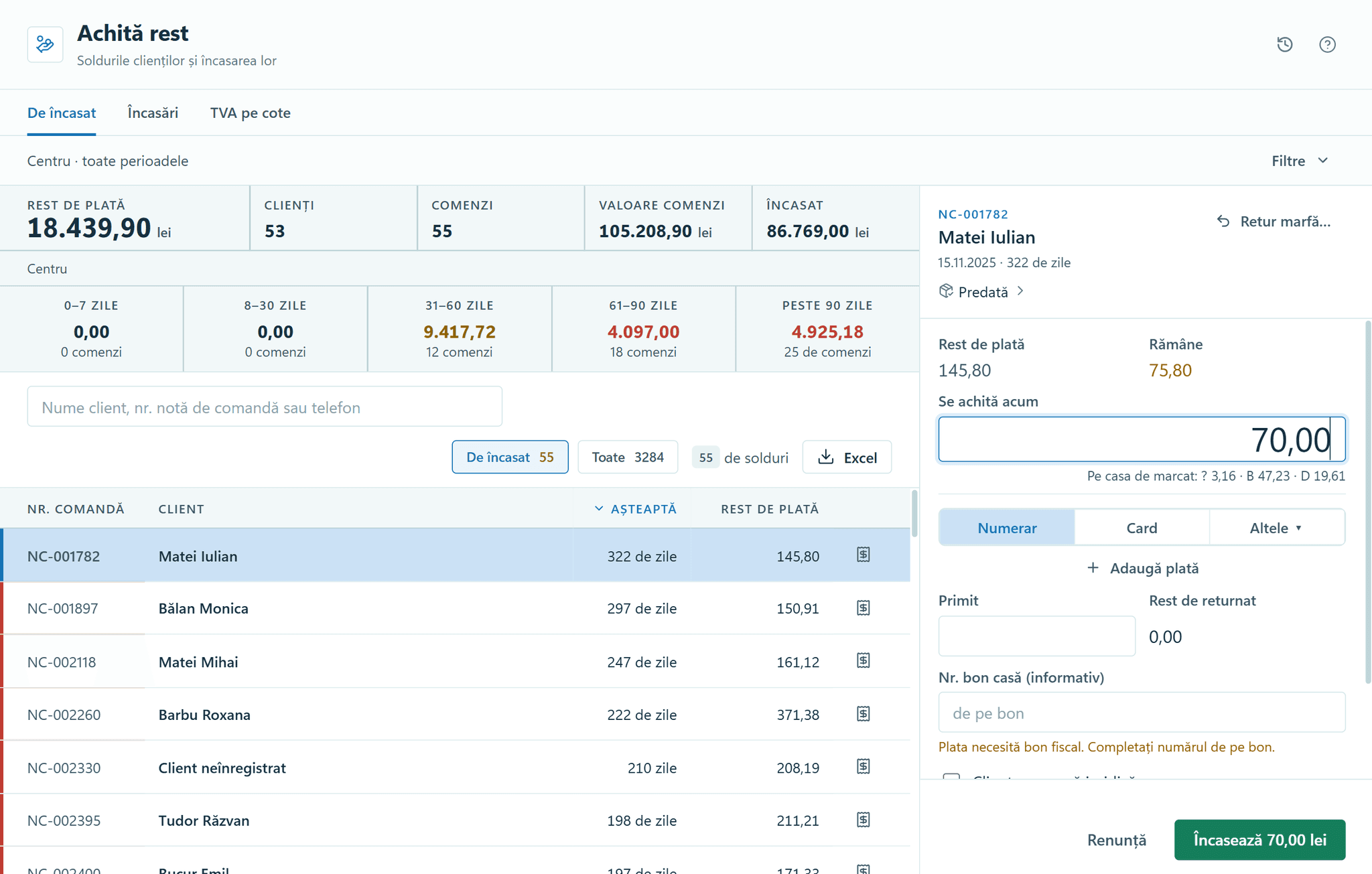
Balance payments — the balances and paying off one order.
The cash book is already filled in
1418
Cash book
The cash book fills in from the day’s cash, and in the evening you close it in one step.
The daily document every business must keep is fed from cash takings and cash payments. In the evening, “Print and close day” asks for the counted cash and the Z report, records any shortfall or surplus, and prints the page.
- Days come from the calendar: a day with no movement still has a page and carries the balance forward.
- A line that arrives after closing is added under “Recorded after printing”, without renumbering.
- The Z total is compared with the cash from sales, net of reversals on the same day.
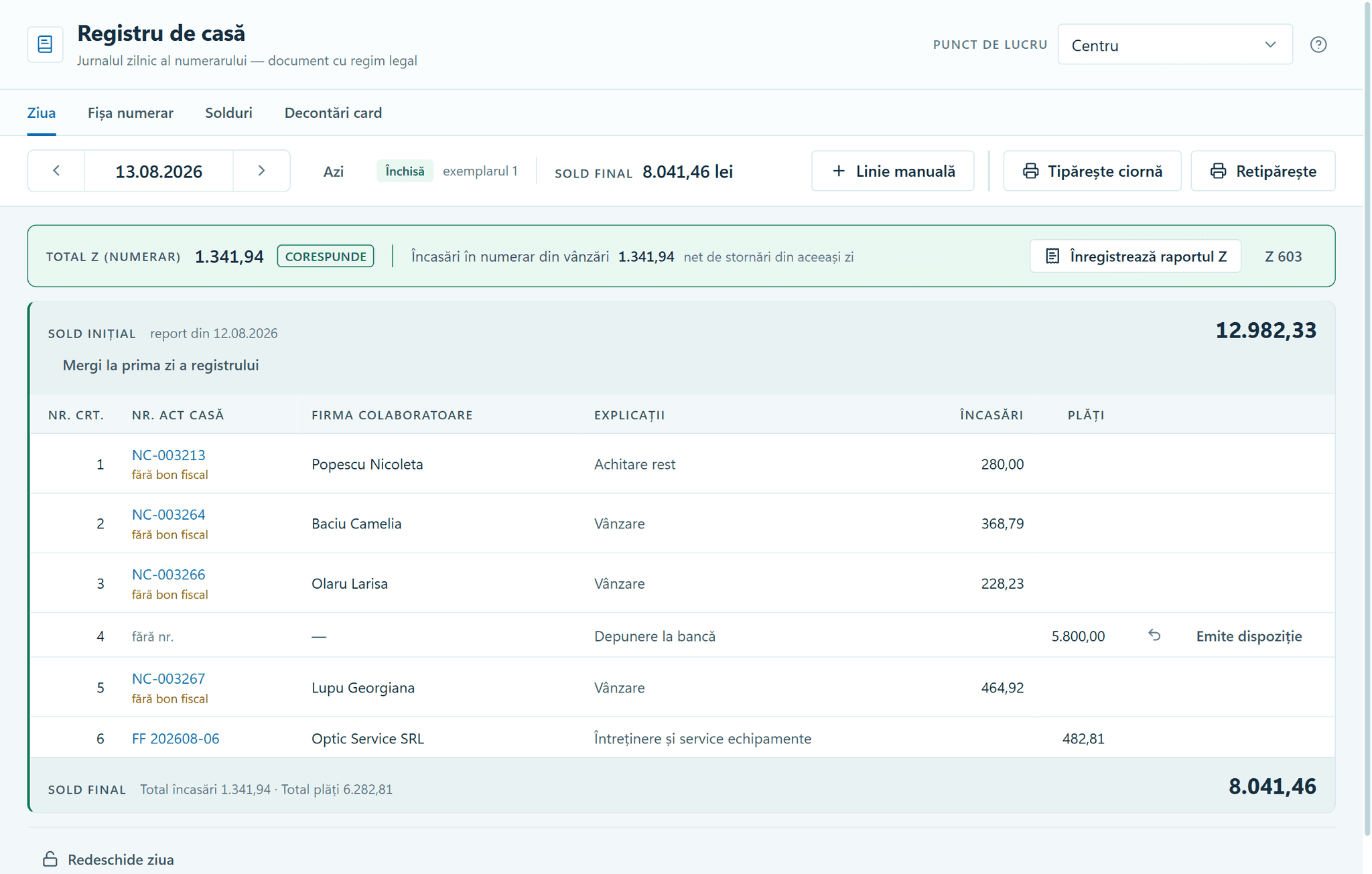
Cash book — the closed day, with its balances. 1518
Expenses
See expenses by category, by location and by payment method.
Each expense’s receipt is attached as a photo or PDF and opens from its row. A wrong expense is reversed on its own day, and both lines show with “Show reversed expenses too”.
- A cash expense becomes a line in the Cash book in the same operation.
- A payee you’ve paid before, picked from the list, brings back last time’s category and description.
- When the same receipt is saved twice within ten minutes, the program asks “Record another one?”.
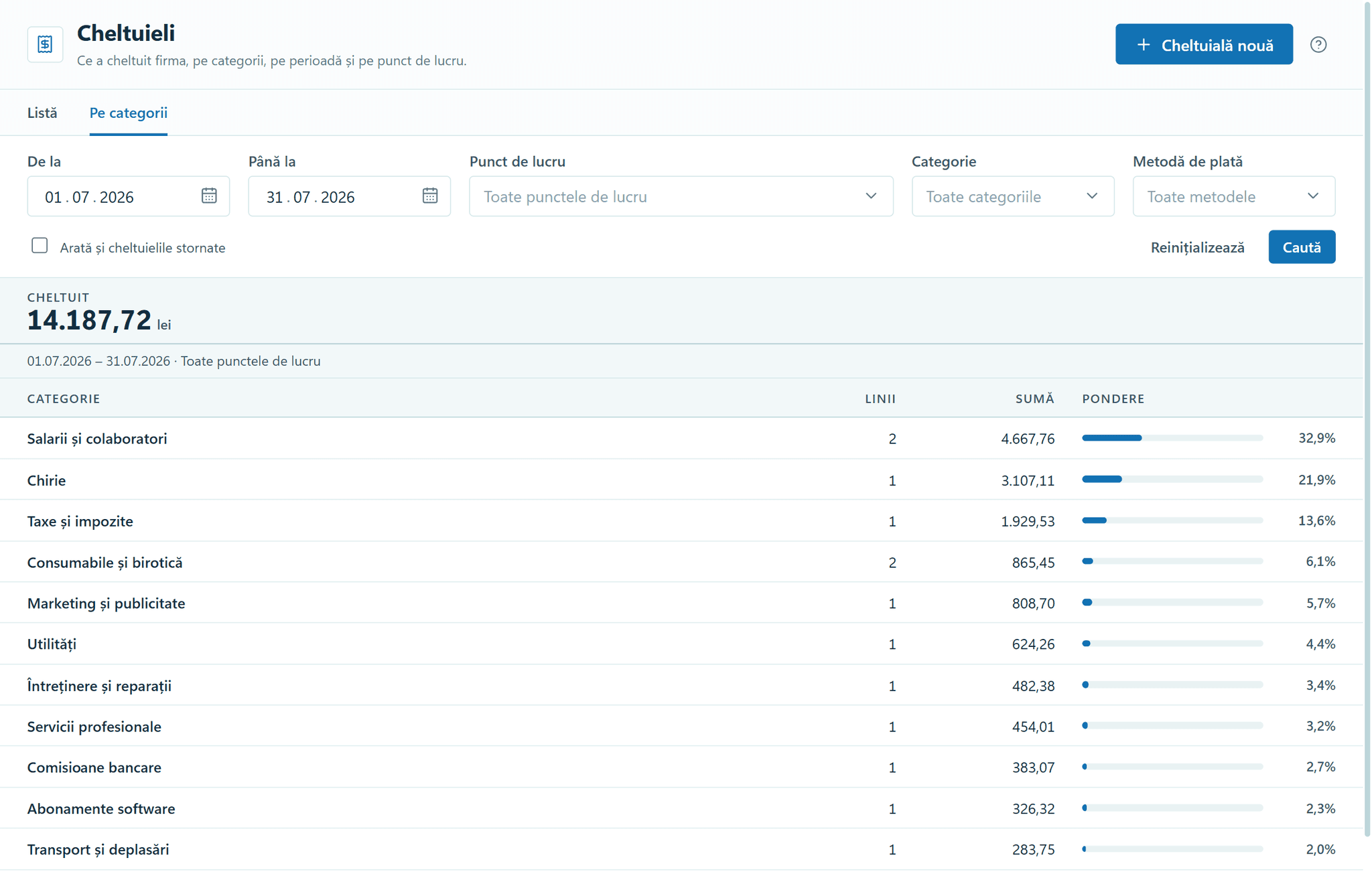
Expenses — the month, by category. 1618
Financial reports
Five reports compare the chosen period with the previous one and with last year.
The reports cover sales, profitability, expenses, takings and balances, and conversion, each as a summary or a list, with export to Excel. “Operating result” subtracts expenses from margin, for each location and for the whole company.
- On the 3rd of the month you compare days 1–3 with days 1–3 of last month, and a week with the same weekdays last year.
- A line’s cost is the cost at the moment of sale, and a line with no cost shows “—”, never 0.00.
- VAT is extracted once per rate from the summed gross, not by adding up the rounded VAT on each receipt.
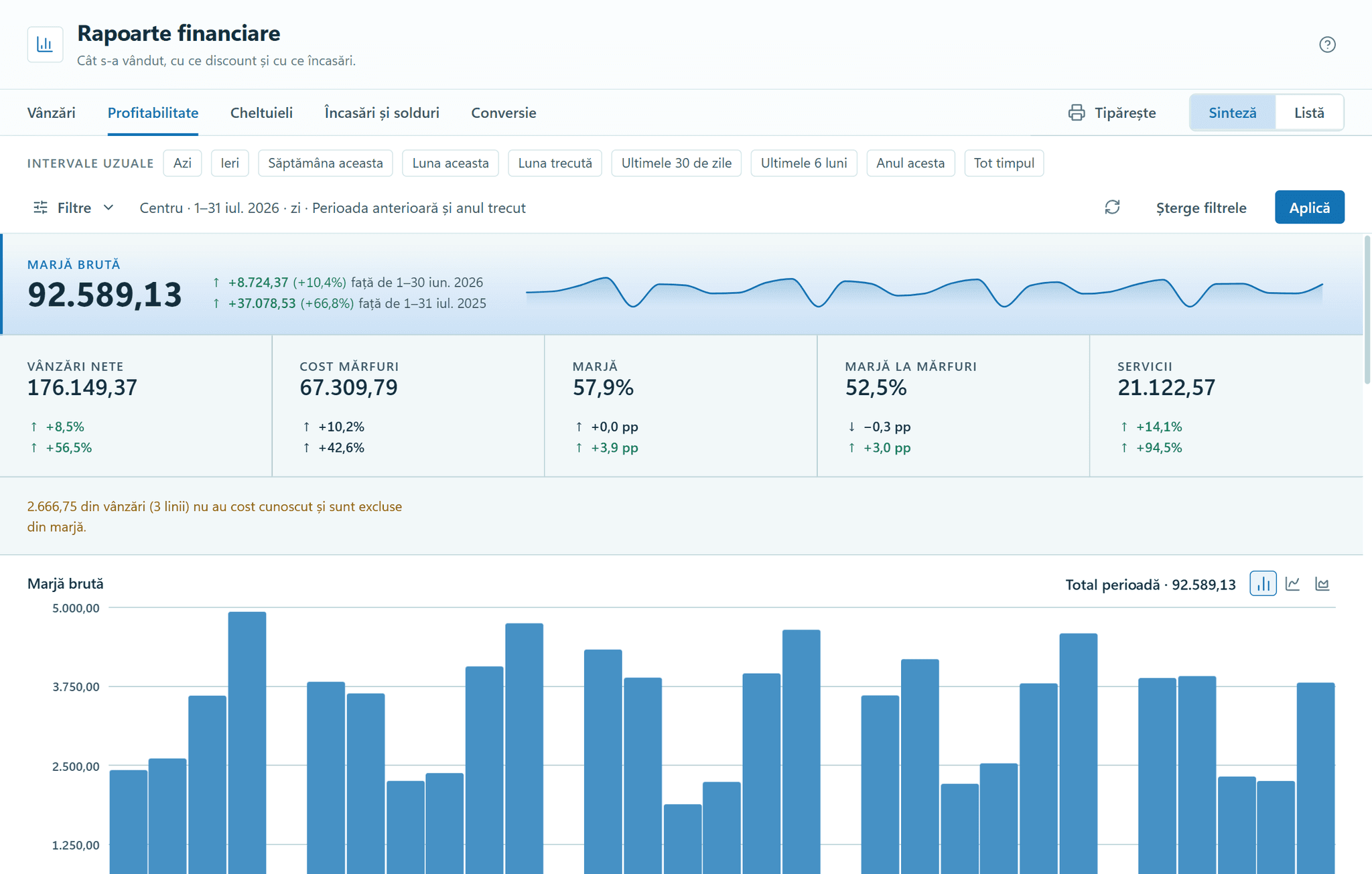
Financial reports — the margin, by month and by day. 1718
Invoicing
Invoices are validated for e-Factura, Romania’s e-invoicing system, then numbered and archived; you upload them to ANAF’s SPV portal yourself.
You issue invoices, advance invoices, credit notes and pro formas, for individuals and companies. “Look up at ANAF” fills in a company’s details from the tax authority’s register by its CUI (company tax ID), and one invoice can cover several sales to the same company.
- Two 0% exemptions, with and without the right to deduct, sit on separate subtotals, each with its legal basis printed.
- The e-Factura file is checked before export, and an error names the element, for example BT-31, and the screen where you fix it.
- Each invoice shows its submission deadline, counted in working days, excluding public holidays.
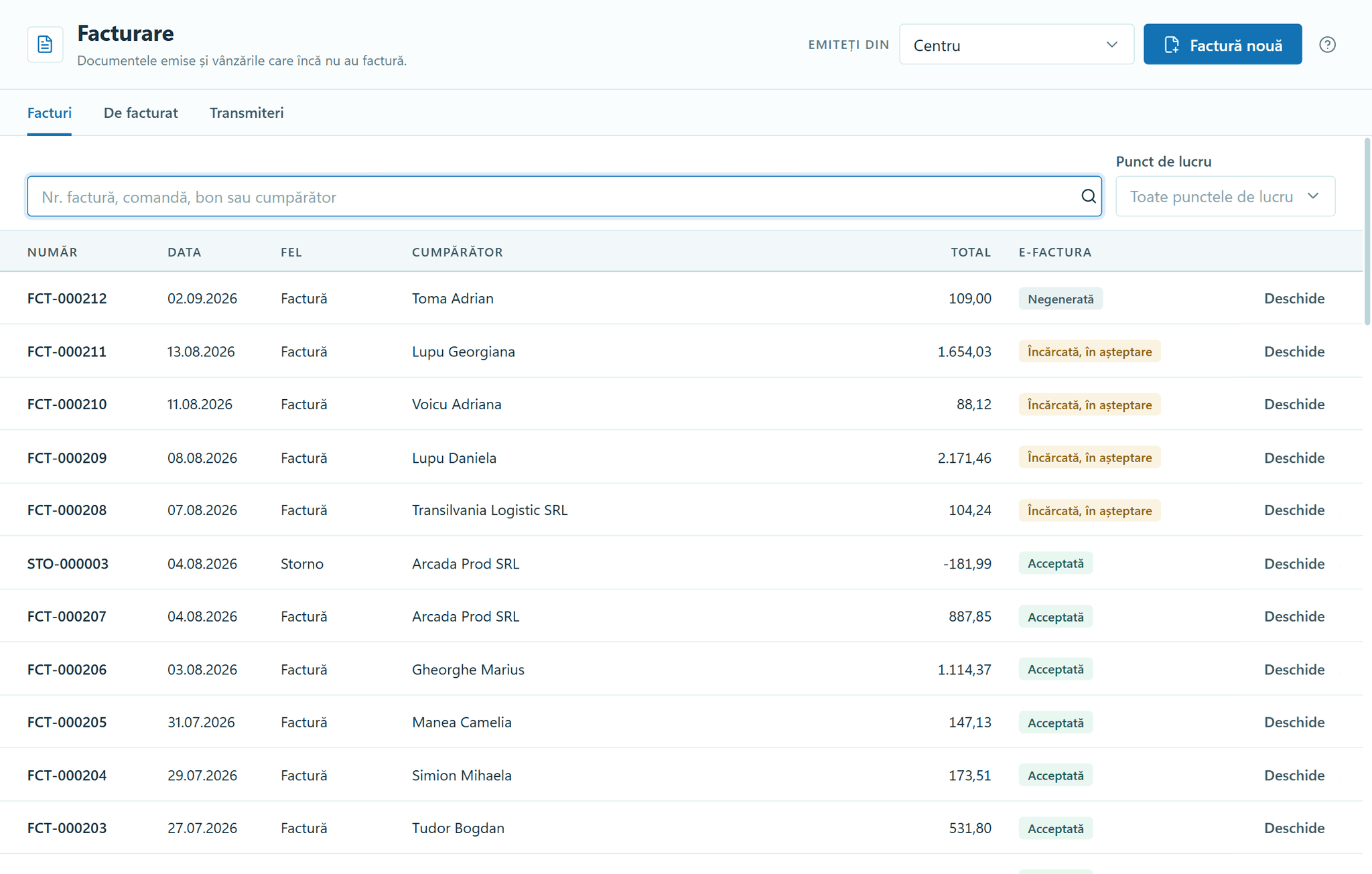
Invoicing — the documents issued and their e-Factura status.
Patients receive messages
1818
Messages
Reminders, check-up invitations and the notice that an order is ready write themselves from appointments, consultations and orders.
Messages go out from your own account with the provider. For SMS, the practice’s name is registered with each mobile network, which takes up to four weeks, and some networks charge a fee. Birthday and name-day greetings and campaigns go out only from a number that can receive replies.
- A patient gets one message a day, and an appointment comes before a recall, which is kept with its reason.
- The counter shows how one accented letter such as “ă” cuts a segment from 160 to 70 characters, and marks that letter.
- Greetings and campaigns go out only from a number the patient can reply STOP to, and never between 22:00 and 08:00.
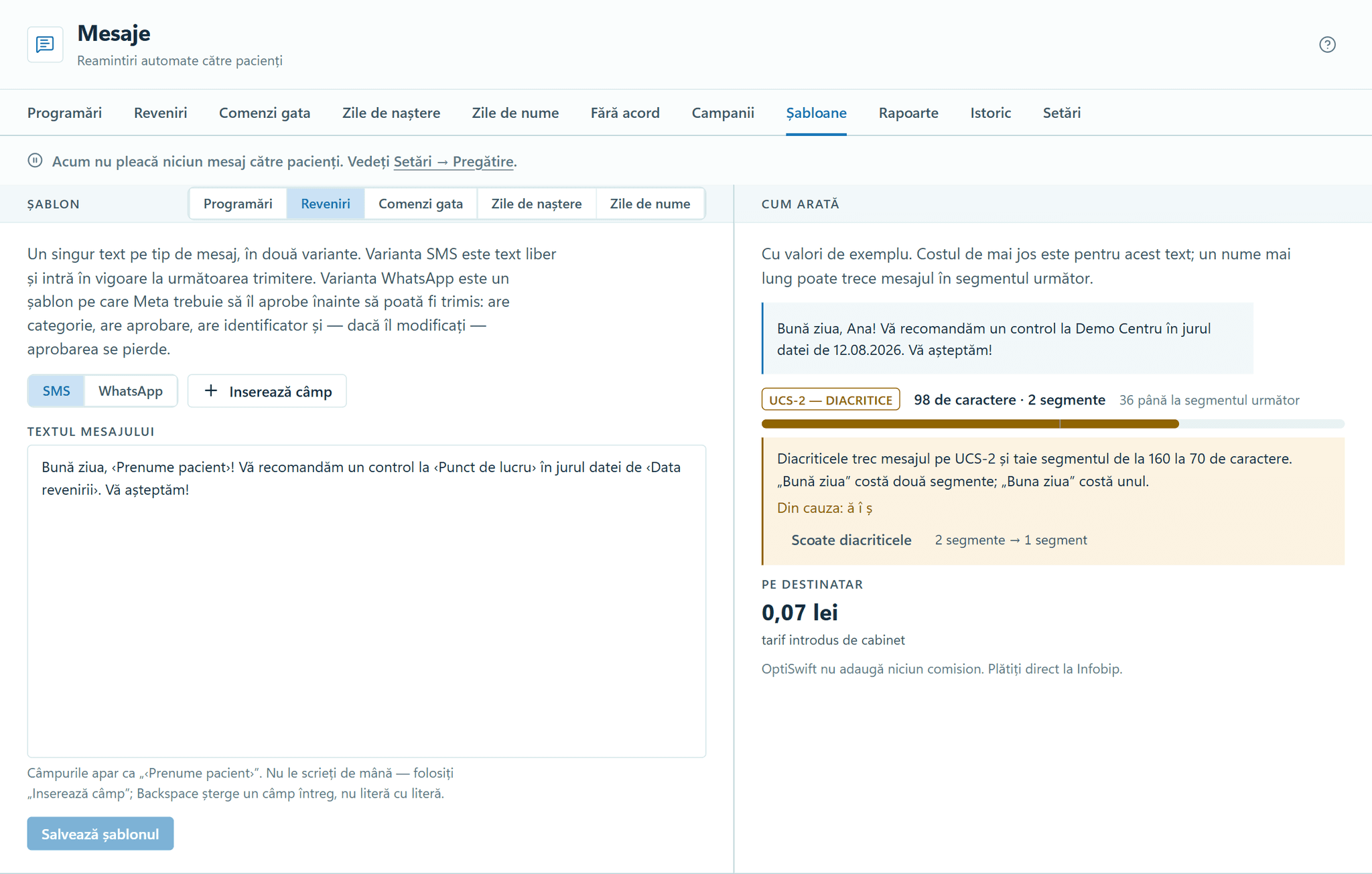
Messages — the template, the message and its cost.
All the modules above come in a single installation and work on the same data. Work you have started waits for you when you come back from another screen.